Diagrams age. Code doesn't lie.
Architecture diagrams age faster than any other artifact we produce — the code moves, the diagram doesn't, and after a few sprints the diagram describes a system that no longer exists. The fix is not more discipline. It is tooling: derive the structural facts from the code, keep the human judgment as a curated layer on top, and make re-running the derivation non-destructive, so the machine's facts and the human's meaning can coexist in one model. That last property is the hard part, and it is the difference between generated diagrams you trust and generated diagrams you regenerate once and abandon.
Why discipline fails
Everyone has agreed, at some point, to "keep the diagrams up to date". It fails for a structural reason, not a moral one: updating a diagram is never on the critical path. The PR merges whether or not the box moved. Any process that relies on remembering to do off-path work loses to deadline pressure — every time, on every team, including yours and mine.
Docs-as-code is the practice of treating documentation like source: stored in version control, reviewed in PRs, built by CI. Applied to architecture, it ranges from text-to-diagram languages to full model-based toolchains. The common thread: the diagram is derived from something versioned, not drawn from memory.
Two failure modes, one middle path
The pure extremes both disappoint:
- Fully hand-drawn ages, as above.
- Fully generated is honest but unreadable: extraction sees every package and every import, and it sees no meaning. It cannot know that three services form "the payment domain", or which dependency is load-bearing versus incidental. You get a hairball with perfect fidelity.
The useful place is the middle: the machine contributes facts, the human contributes judgment. Extraction finds the systems, containers, and dependencies. A person names the domains, writes the one-line descriptions, hides the noise, decides what deserves a diagram.
Which immediately creates the real problem. The code changed, so you re-run the extraction. What happens to everything the human added?
The merge is the product
If a re-run silently overwrites curation, people run the tool exactly once. So the merge has to behave like this:
- Additions are proposed, not imposed — new containers and dependencies arrive marked as new.
- Removals are opt-in. The extractor no longer sees a container? It asks. Maybe the code moved; maybe the extractor missed it. Deleting silently is how trust dies. And anything a human authored by hand — never extracted in the first place — is never a removal candidate at all.
- Conflicts are explicit. You renamed a node in the model; the code renamed it too, differently. That is a decision, and the tool's job is to present it, not resolve it by policy.
- The contract is published. The generated model should be plain JSON against a versioned schema, so it survives tool versions and can be produced or consumed by other tooling.
This is the guarantee CRAYON-C4's extractor is built around: a re-run never silently discards manual curation. In practice it looks like:
npx crayon-c4 .— which scans the repository and writes a model file against the published schema. Importing it into an existing project opens a review: added, removed, renamed, conflicted — each its own decision. There is also a VS Code extension that regenerates and shows the result next to the code it came from.
This is the curated layer in practice: a container the extractor found, with a human-written description sitting in the same editor pane as its structural facts — name, element type, technology.
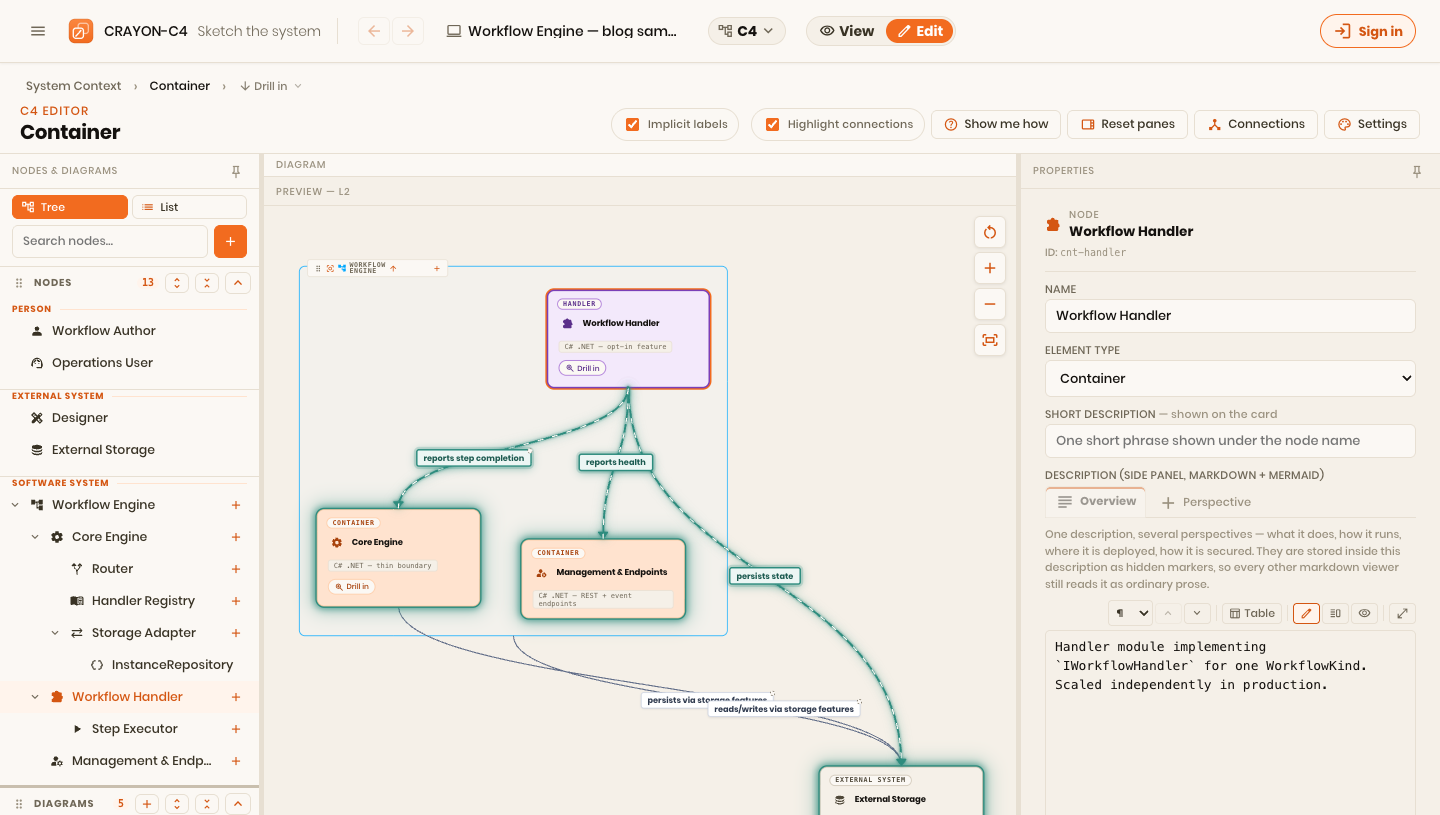
The demo below is what the middle path produces — an extracted structural skeleton with curated names, descriptions, and diagrams on top:
What to extract, what to write
A practical split that has held up:
| From the code (facts) | From a human (meaning) |
|---|---|
| Systems, containers, components | Names that mean something |
| Dependencies between them | Which dependencies are load-bearing |
| Technology labels | One-line "why this exists" descriptions |
| The raw inventory | What deserves a diagram at all |
Treat descriptions as the human layer, permanently. If a description could be generated from the code, it wasn't worth writing down.
Next, and last in this series: a full tour of CRAYON-C4 itself — the one-model idea underneath all four posts, how I use it day to day, and what's free.