C4 is too much, and too little
The name C4 does you a small disservice. It makes you think you owe the model four diagrams — context, container, component, code — as if a system were only fully described once all four exist. In practice you almost never need four. Most systems are explained well by one or two, and those one or two say more than any wall of prose could. That is the first half of the argument in this post. The second half is the uncomfortable other side of it: even drawn to full depth, C4 does not tell the whole story. It is not a golden hammer. It is the opening move of a conversation — and knowing what it deliberately leaves out is what makes it useful rather than misleading.
The C4 model describes software as a hierarchy of abstractions — a system is made of containers, a container of components, a component of code — and gives each level a diagram aimed at one audience's question. It is a notation for communication, not a completeness checklist. See c4model.com.
A picture everyone reads the same way
I had a genuinely complex project recently, and instead of writing it up I drew it. High abstraction first — here are the components, here is the landscape they live in — and then one level down, here is what actually sits inside each container. The feedback was immediate. A developer who had to work on it looked at the diagram and said, plainly, "it makes sense." And then the questions started — sharp, specific ones about a particular coupling, a particular component. Those questions were the point. We would not have reached them for another week of meetings without the picture. That is where C4's value actually lives: not in documentation, but in getting a room full of people to the specific questions faster, because everyone is looking at the same thing and interpreting it the same way.
That is a claim about representation, not about diagrams being pretty. A shared, unambiguous picture collapses the ambiguity that prose carries. Text about a system forces every reader to build their own mental model and hope it matches yours; a diagram everyone reads the same way removes that gap and lets the disagreement surface where it's useful — on the specifics. Simon Brown built C4 around exactly this idea: a small, consistent set of abstractions so that two people pointing at the same box mean the same thing.
You rarely need all four
Here is the part the name hides. The lowest levels of C4 are the internal levels — components, and below them code. They describe the inside of a thing, not what you can see from the outside. And modelling the inside exhaustively is a bit old-school. That is why the very bottom level, the code level, is usually expressed in UML — and UML is, let's be honest, a bit dated, and not applied nearly as much as it once was.
This is not a hunch. When Marian Petre interviewed fifty professional developers about how they actually use UML, the finding was blunt: the majority don't use it at all, and those who do use it selectively and informally — a sketch on a whiteboard, discarded after the conversation — rather than as a maintained, code-generating model.1 The techniques we teach now, the speed we build at, the way AI writes code — none of it sits comfortably on a notation designed for careful, up-front, class-by-class modelling. So the code level of C4 is not something you sit and draw. If you need it at all, you generate it from the code, because the code is the only thing that stays current. More often, you don't need it: for a container that isn't intricate, reading the code tells the story better than any diagram will.
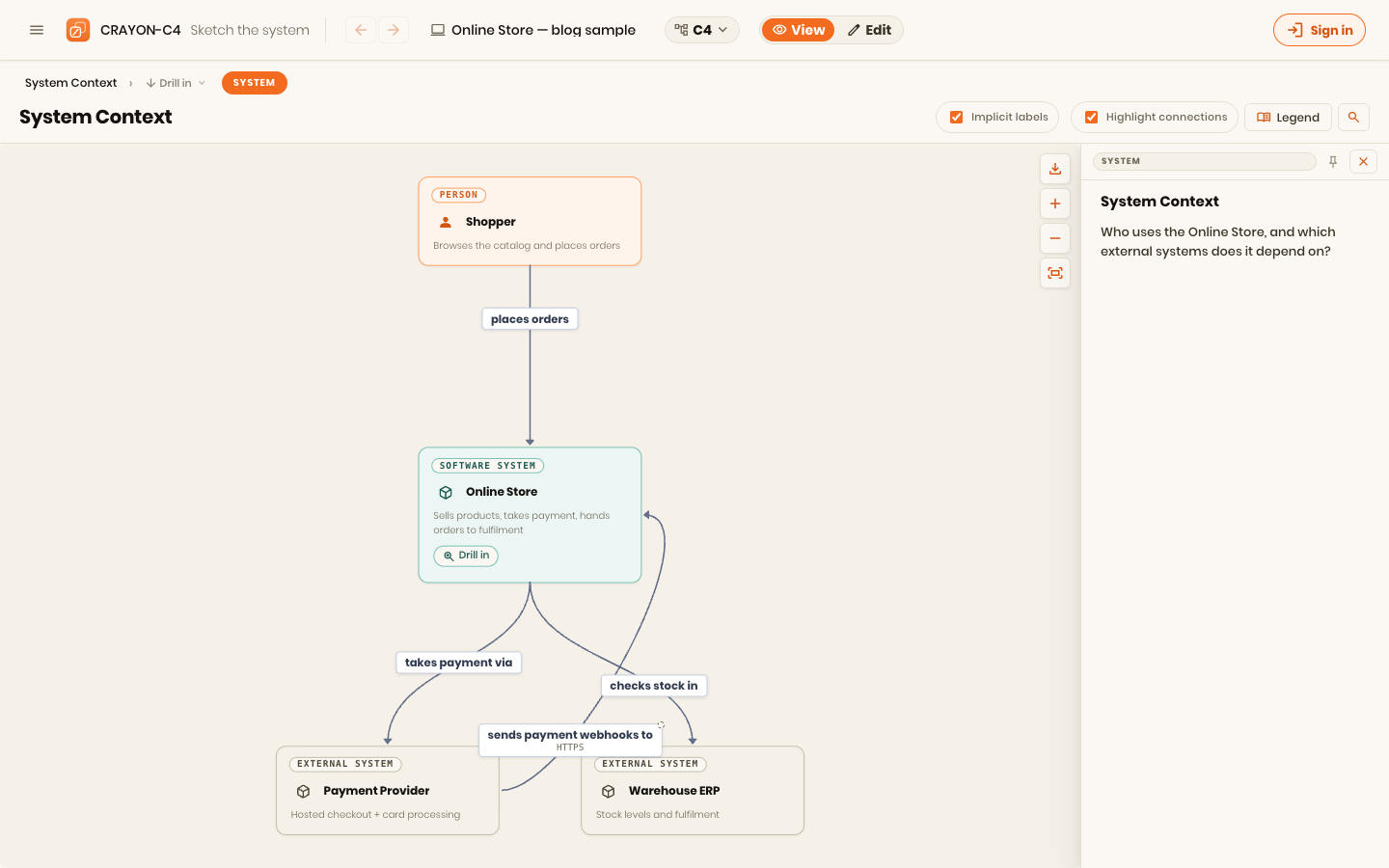
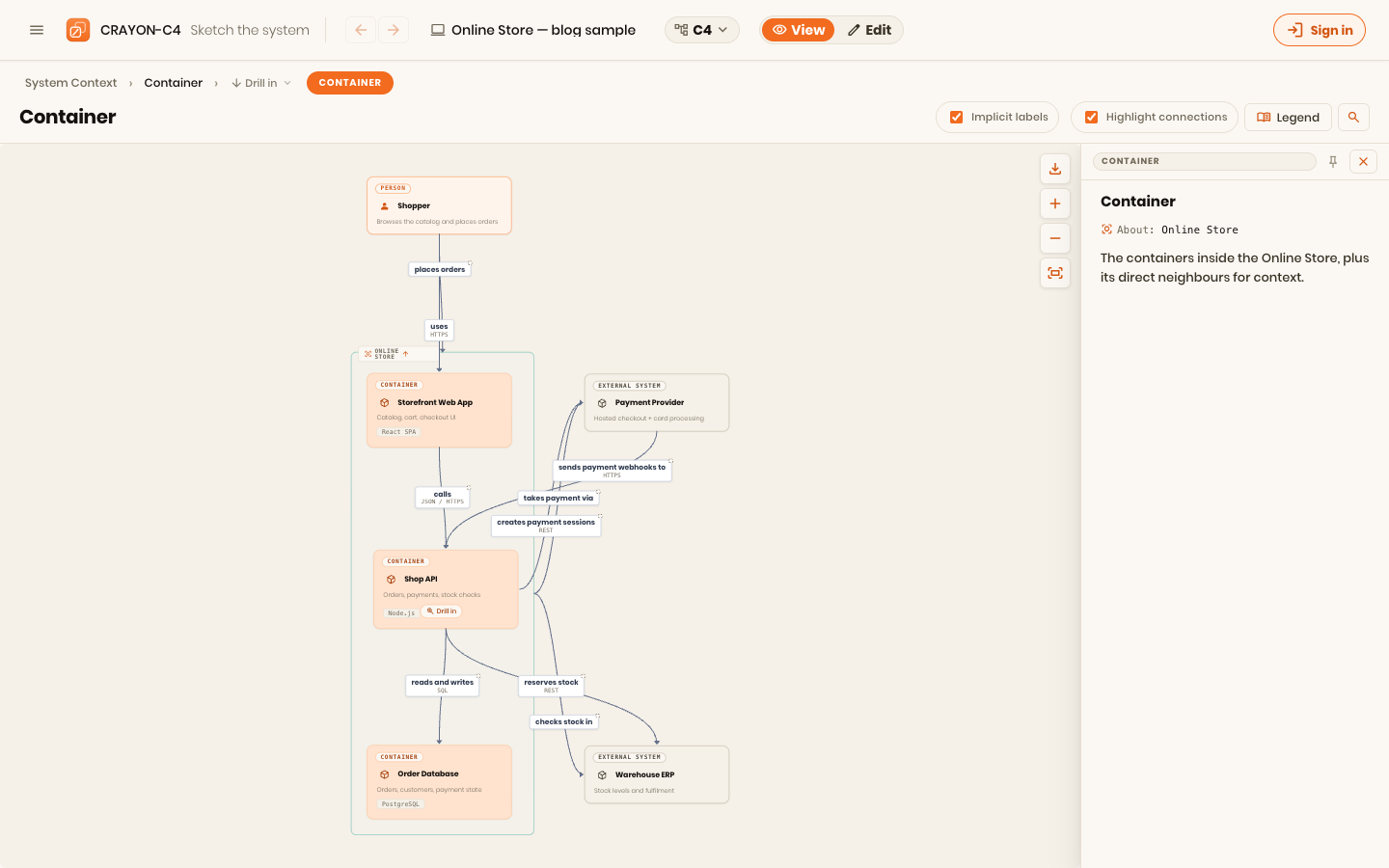
Which leaves, for most systems, the top: a context diagram and a handful of container diagrams. That is the whole model most of the time. The four in "C4" is a ceiling, not a target.
| Level | What it answers | How often you draw it |
|---|---|---|
| Context | What is this system, who uses it, what's around it | Almost always — it's cheap and it sets scope |
| Container | What are the running pieces and how do they talk | Usually — this is the working diagram |
| Component | What's inside one container | On demand, when a container is genuinely intricate |
| Code | Classes and methods inside a component | Rarely, and generated — never hand-maintained |
The top two rows, on a real model — a context diagram and the container diagram beneath it, which is where most systems' documentation actually stops:
And yet it's not the whole story
Now the honest limitation. Draw all four perfectly and you still have not described the system. C4 tells you how the software is put together — what the parts are, what depends on what, how systems are connected. But how two things are connected says nothing about when they talk, or how that conversation actually unfolds over time. Structure is a "what exists" view. It cannot answer "what happens when the user clicks Pay." For that you need behavior diagrams — flows, and yes, the sequence diagram from UML earns its keep here.
And even then you're not done, because how the code depends on itself is a completely different thing from how it gets deployed. Which pieces are deployable, how many instances run, how they're configured, how they talk across a network — all of that depends on scale, load, peak traffic, performance. None of it lives in a context or container diagram, and it shouldn't. It needs a deployment diagram, tying the containers to the hardware — virtual or the actual iron — they run on. Simon Brown says this himself: C4's four abstraction diagrams are the static structure, and behavior and deployment are supplementary diagrams you add when the question calls for them.2
So C4 is too much — you're rarely obliged to draw four levels — and too little — four levels still don't cover behavior or runtime. Both are true, and neither is a criticism. They're the same observation from two sides: C4 is a starting point for a conversation, not a complete description of a system. It gets everyone to a shared picture fast, and then it hands off — to a flow diagram, a deployment diagram, a code listing — for the details that particular moment needs.
Rules of thumb
- Draw the fewest diagrams that answer real questions. If you can't name the question a diagram answers, don't draw it.
- Treat the code level as generated, never hand-drawn. It changes on every commit; only extraction keeps it honest.
- Start high, drill on demand. Context and a few container diagrams are the whole model for most systems.
- Know what C4 refuses to show. Behavior and deployment are separate questions with their own diagrams — reaching for C4 to answer them is how a diagram becomes wrong.
- Optimise for the conversation, not the archive. The value is the shared understanding you reach, not the completeness of the folder.
This is the first of a short arc on where C4 stops and what picks up after it — behavior, deployment, and the perspectives a single structure diagram can't hold. It's drawn from CRAYON-C4, the tool I build around the idea of one model projected into many views.
Next in this series: the two questions C4 was never built to answer — when the parts talk, and where they actually run.
References
Footnotes
-
Marian Petre, "UML in Practice," Proceedings of the 35th International Conference on Software Engineering (ICSE 2013), pp. 722–731. Interviews with 50 professional software developers; the majority reported not using UML, and those who did used it selectively and informally. oro.open.ac.uk/35805 ↩
-
Simon Brown, The C4 model for visualising software architecture, c4model.com — the four levels are static-structure abstractions; dynamic (behavior) and deployment diagrams are described as supplementary. c4model.com ↩